

ATLAS.ti 26 Qualitative Analysis Software | NFI CO., LTD.

ATLAS.ti 26 Qualitative Analysis Software

  • ATLAS.ti 26 Qualitative Analysis Software
  • 編號
  • 類別
    Qualitative Analysis Software
  • 介紹
    ATLAS.ti 26 helps you uncover better insights through intuitive research tools and leading-edge technology. It is designed to meet a wide range of needs, from basic analysis tasks to the most in-depth research projects.
  • 價格

ATLAS.ti 26 qualitative analysis
software


WHAT’S NEW IN ATLAS.ti 26

ATLAS.ti 26 represents a huge step toward the future.

We listened carefully to our users and have streamlined and redesigned many areas of the program to even better accommodate users' needs and workflows. Numerous innovative new functions show the way where ATLAS.ti is further headed—and where it continues to lead the pack of similar products.

The sum total of these new features makes for an exciting and powerful new ATLAS.ti experience.

New Features

Create Code Hierarchies, Organize Codes in Folder

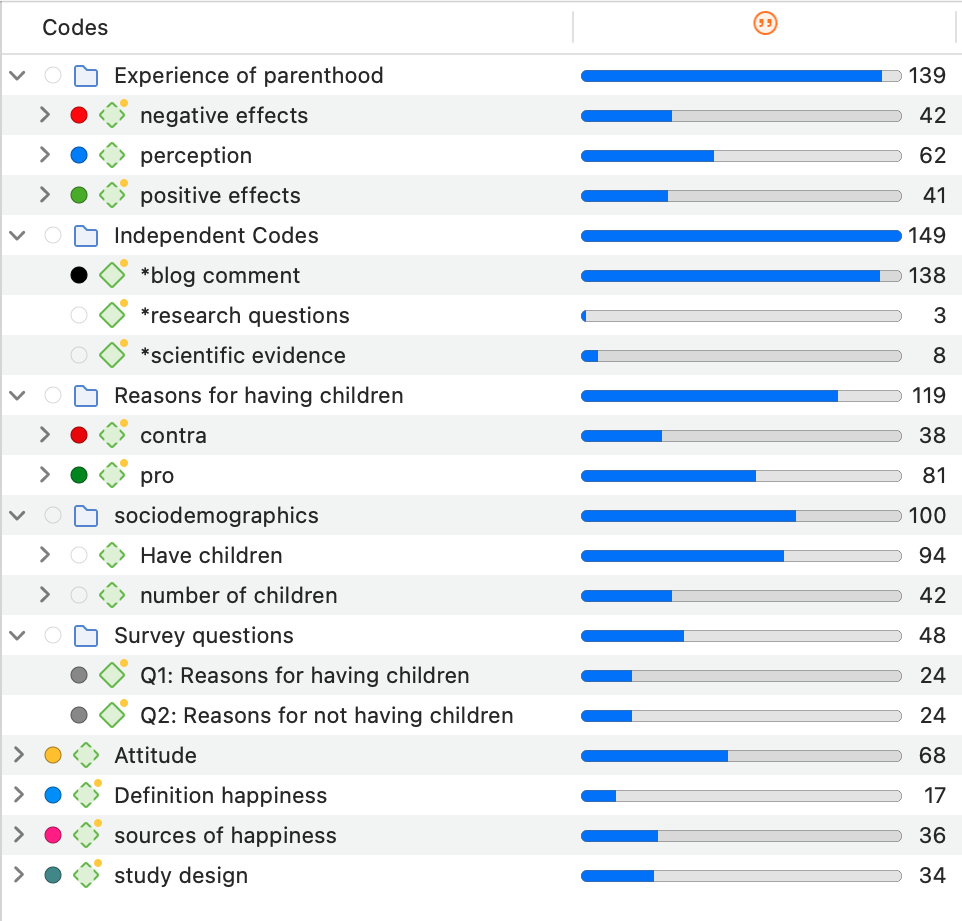
ATLAS.ti 26 offers you new ways to organize your codes in the code system.
Import social network comments

Social networks provide a powerful reflection of the structure and dynamics of the modern society. Often it is not a single tweet or post that is interesting, but the reactions and interactions of the social network users. There are many applications for analyzing user comments such as, social movements, brand communities, marketing campaigns, political discourse, discourses on currently relevant topics within a given community or society, understanding your audience, or even sh*t storms.

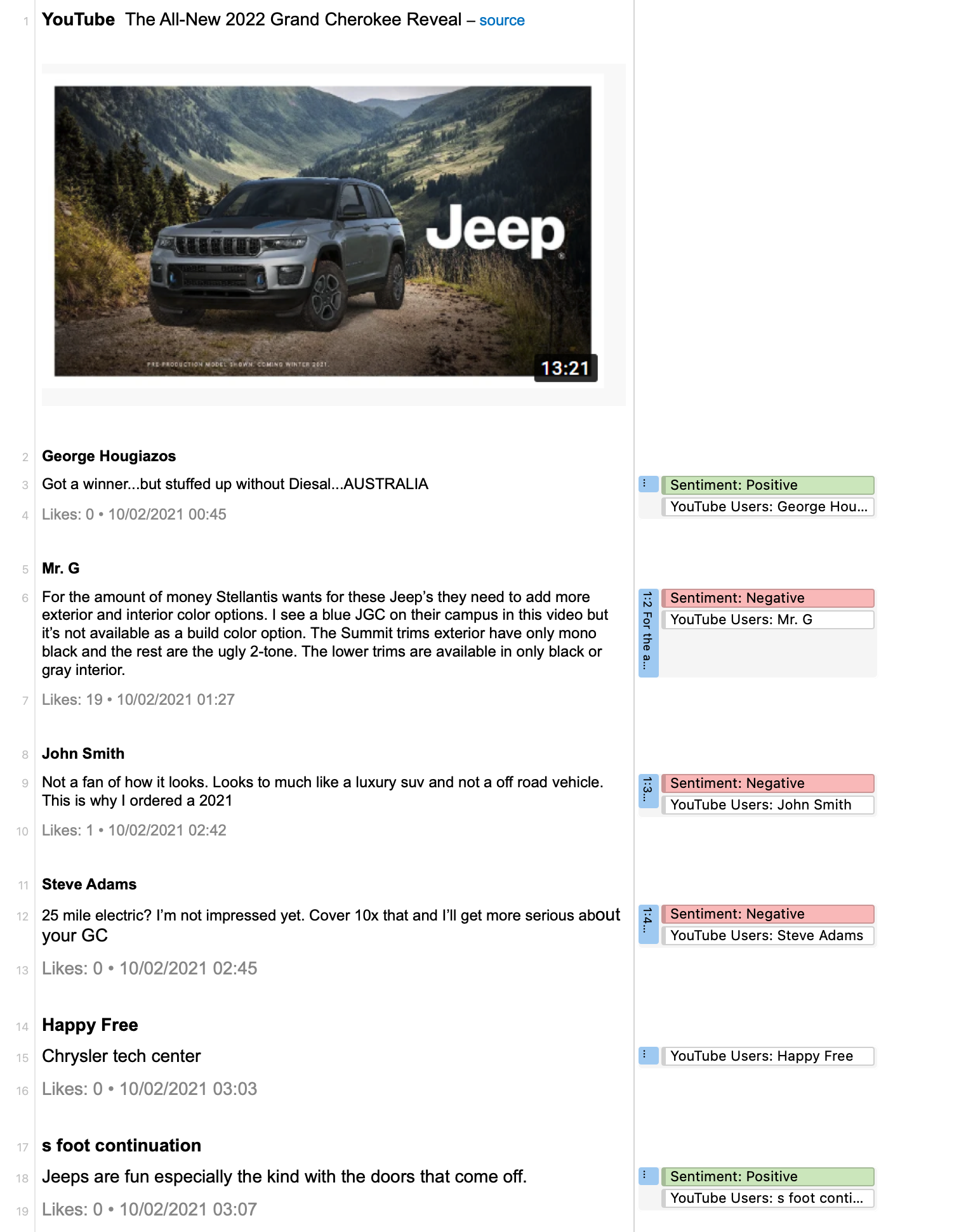
Supported social networks are Facebook, Twitter, Instagram, YouTube, TikTok, VK, Twitch, Discord, Steam. Below you see an imported social network conversation from YouTube on the new 2022 Jeep Grand Cherokee. ATLAS.ti auto-codes all users. In addition, a Sentiment Analysis has been conducted, looking for positive and negative statements.
Improved Survey Import
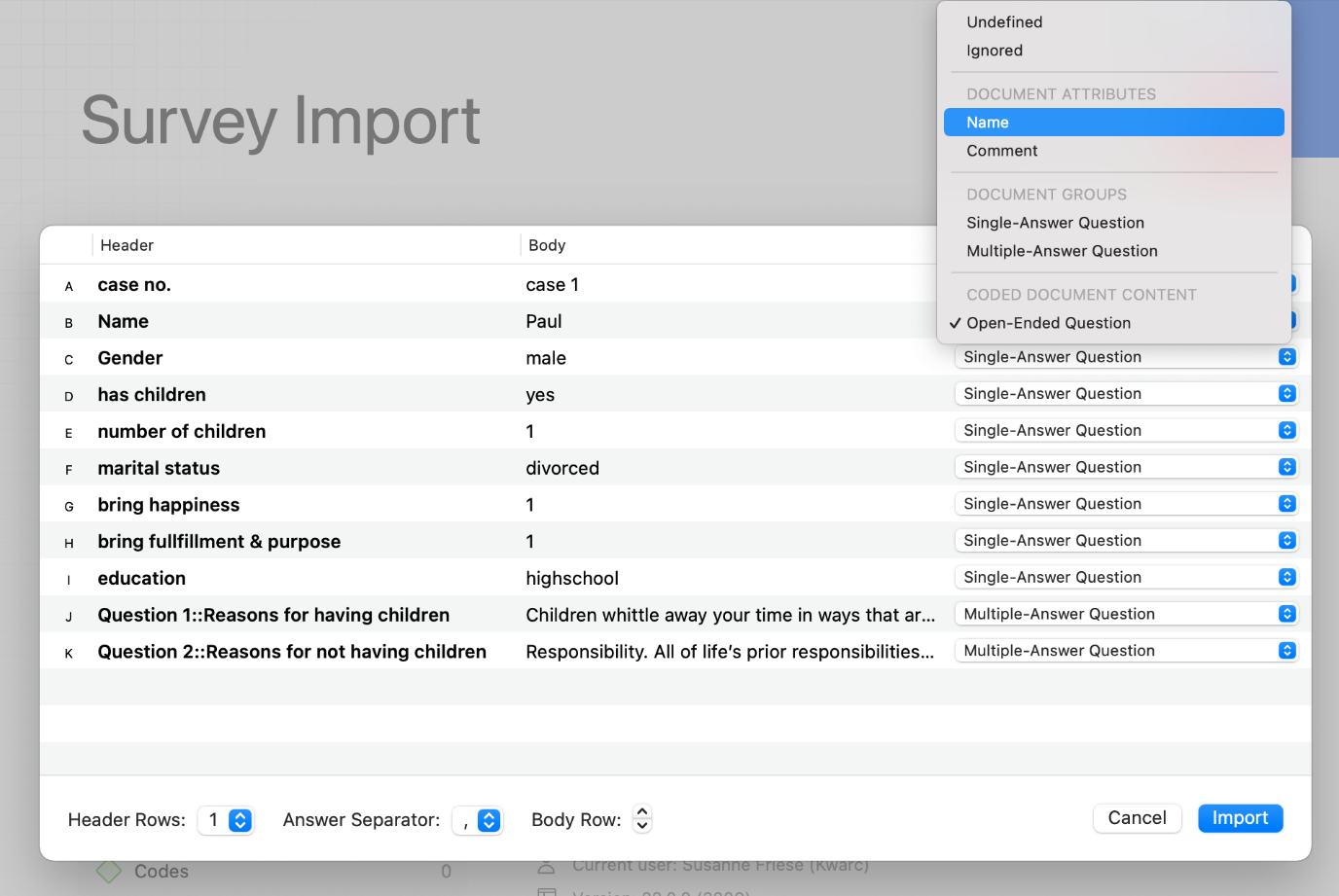
Good news for those working with survey data. We have simplified the import of survey data; there is no longer the need to add any syntax before importing. You can import data as it is exported from Google Forms, Survey Monkey, Qualtrix, and the like. With the help of a wizard, you can decide which data should be included or excluded, which data should be transformed.
Concept Search
This is a great new feature if you need to gain insights quickly. But there are numerous other applications, for instance to code literature for a literature review or to find information in larger reports. The concept search finds relevant concepts for you based on noun phrases. You can review results in context and can decide what you want to code.
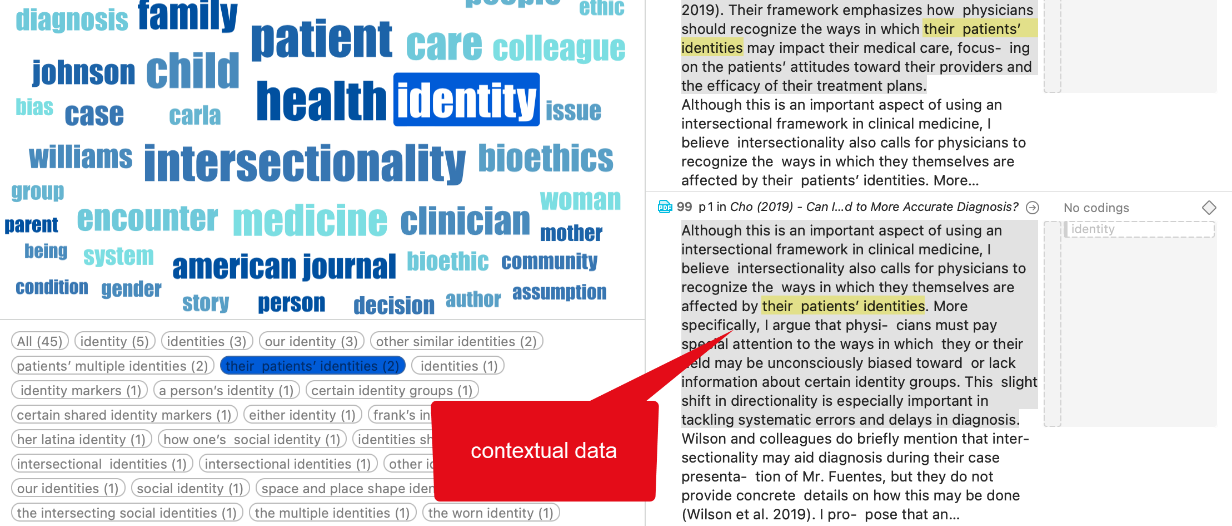
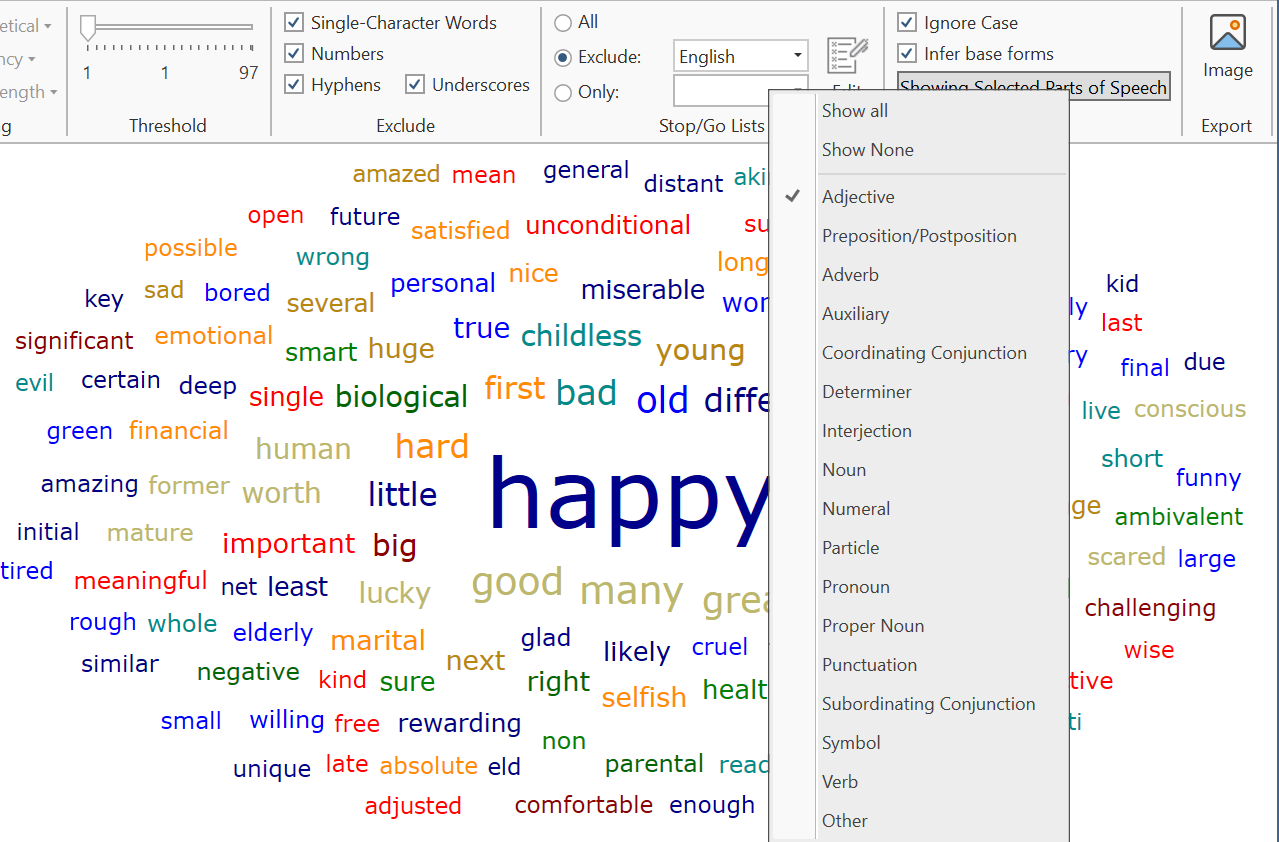
Analyze Parts of Speech in Word Clouds and Lists
The word clouds and lists received a further filter option. Filtering by parts of speech allows you to filter your data by specific grammatical elements (parts of speech) like adjectives, nouns, numerals, pronouns, etc. Below you see an example that only shows adjectives:
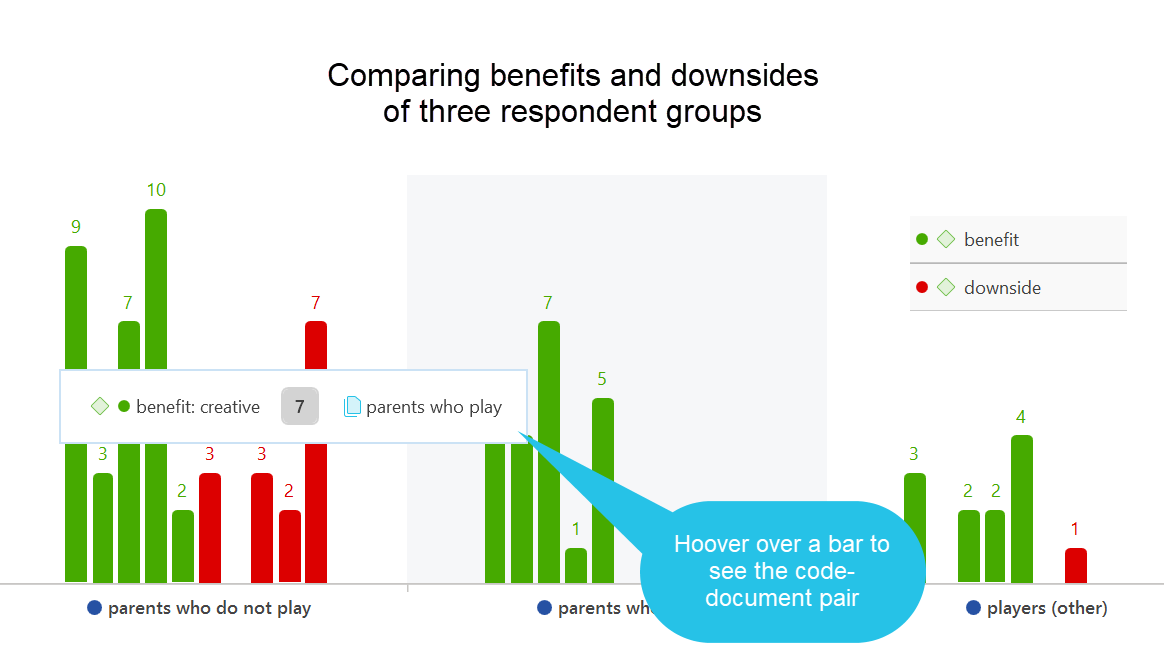
More Data Visualizations
Data Visualization is a great way to simplify the complexity of understanding relationships among data. The Sankey Diagram is one such powerful technique to visualize the association of data elements, which we introduced in version 9. In the new version you can also create bar charts as alternative views.

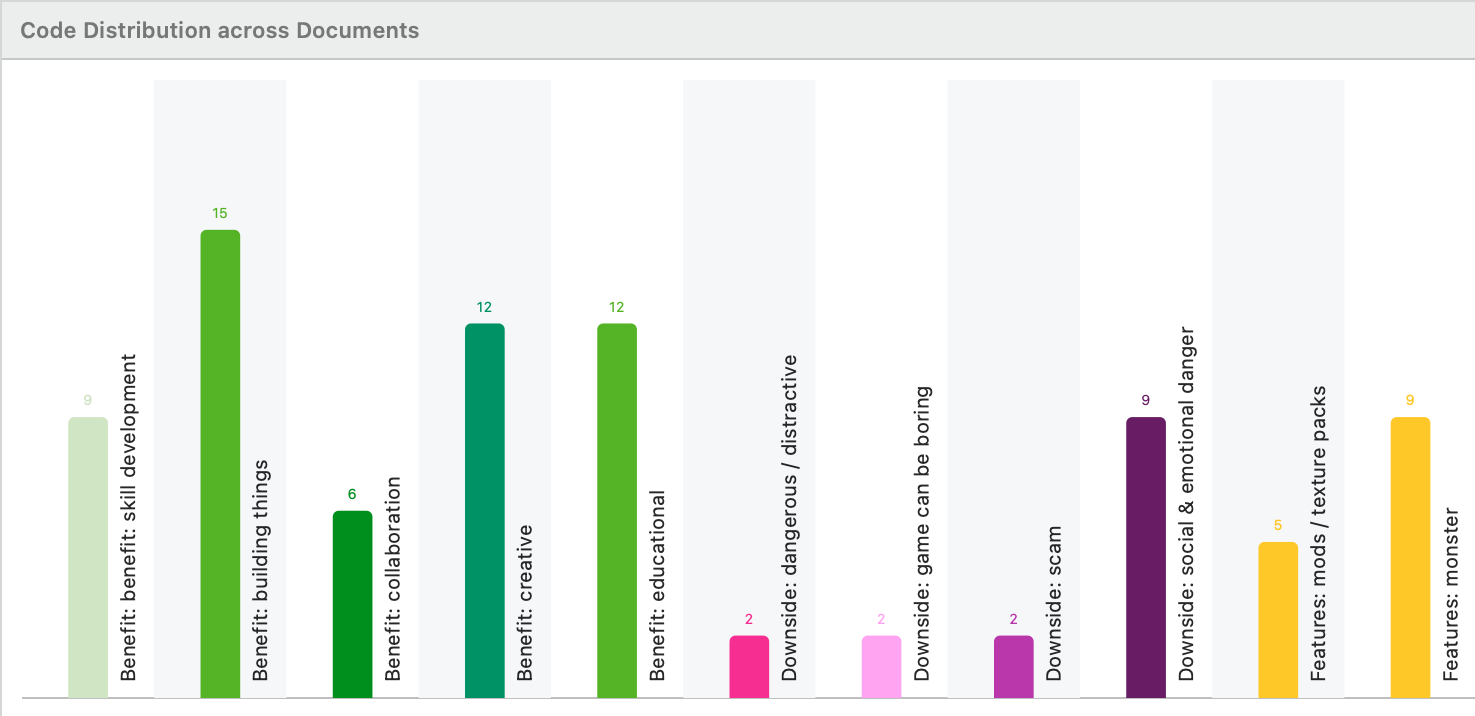
Analyzing Code Distributions
After having coded the data, a look at the code distribution gives you a feel for the data. Which topics were mentioned more or less frequently, by whom, is there a difference between different groups of respondents? How are the topics distributed? Code distributions are displayed in the Document Manager and in the Code Manager.
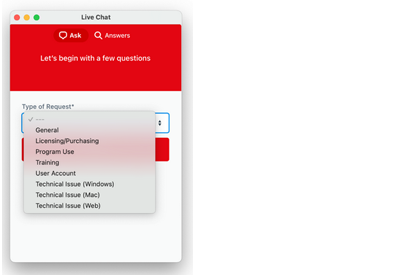
Live Chat
In addition to our email and telephone support, you can now also chat with us if you have a question or a problem. In ATLAS.ti Windows, you can access the Live Chat via the Help menu. In ATLAS.ti Mac, you find the Live Chat option in the toolbar.
New License Models
We introduce the 3-year subscription model. It gives you absolutely great value for the money: Receive all major version upgrades during the entire duration of lease, a lower lease price compared to the annual lease, the possibility to prepay for multiple years, thus being able to meaningfully invest available budget moneys, and a lower annual rate.

We are switching to subscription licenses to ensure that all users always have the same program version. In the past it has been shown that the cooperation of users with different versions has led to problems, which can be avoided if all have the same version.

This became more and more important since the ATLAS.ti Windows and Mac desktop versions are fluently compatible with each other, so that projects can be moved between them at any time forth and back and like that everyone can work in a mixed team and also since projects from the Web version can be imported to the desktop versions and vice versa. All this would be very complicated if our users would work with different versions.

Perpetual licenses, i.e. licenses that included a version with unlimited use, was purchased mainly because institutions and companies did not have certainty about future budgets. To accommodate this need, we have therefore introduced a three-year subscription that is paid in advance to solve this problem. An institution can now spend what it currently has in its budget and purchase a license that is valid for a minimum of three years.

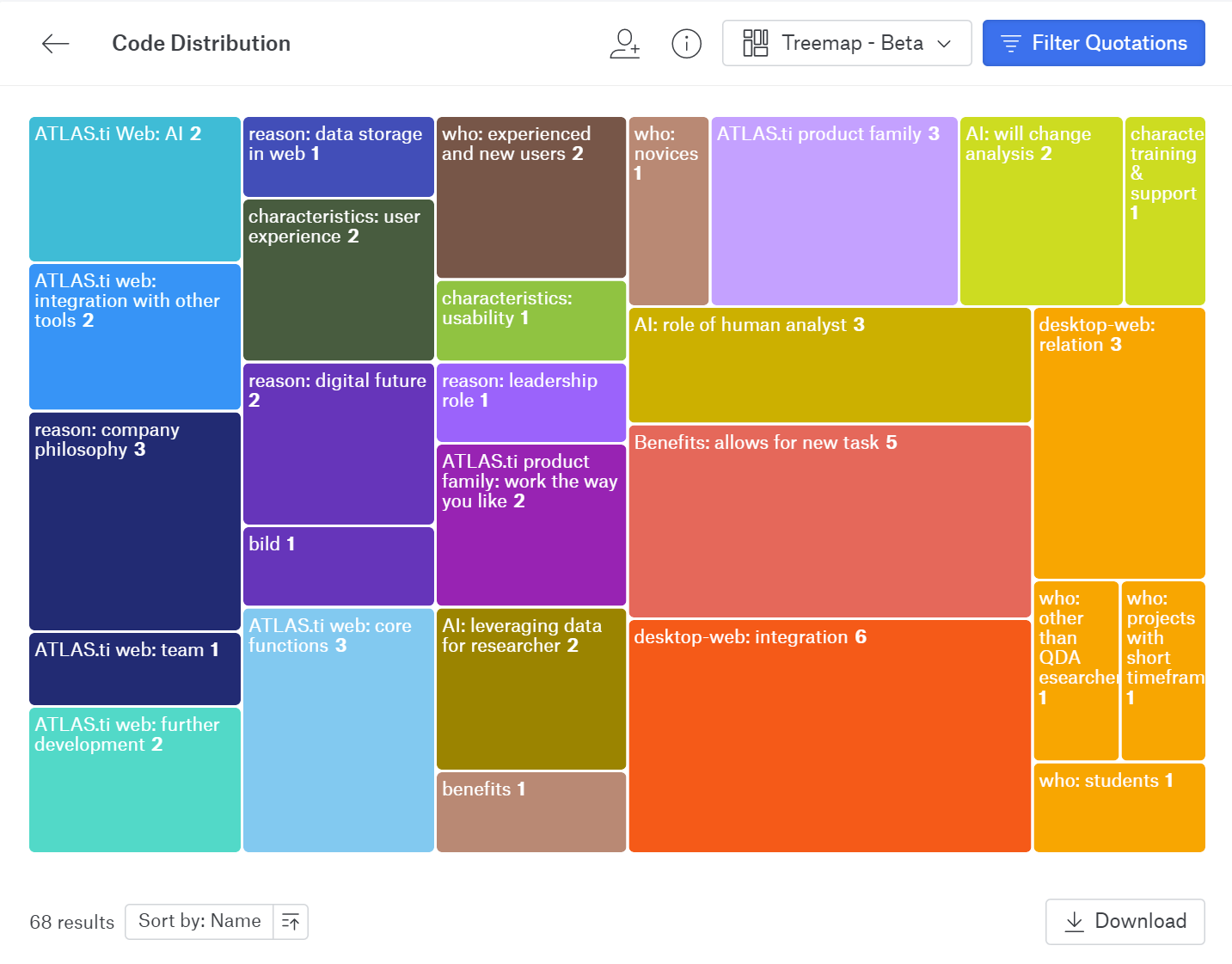
New in ATLAS.ti Web: Visualizations, Import
We have added great new visualizations in ATLAS.ti Web (see above examples of a Donut Chart and a Tree Map), as well as the possibility to import ATLAS.ti 26 projects from the Windows and Mac versions.
Miscellaneous
We have added synonym lists for all interface languages and improved the database so you have more and better choices.
For data import from reference managers, we now also support the .bitTex format. Combined with the Endnote .xml format, this gives you an almost 100% compatibility with all reference managers.

We have extended the range of file types that ATLAS.ti Windows can read. The following file types can be imported and transformed into PDF documents:
eBooks in. epub and .mobi formats
Microsoft Visio and Libre Office / OpenOffice Draw
PowerPoint slides
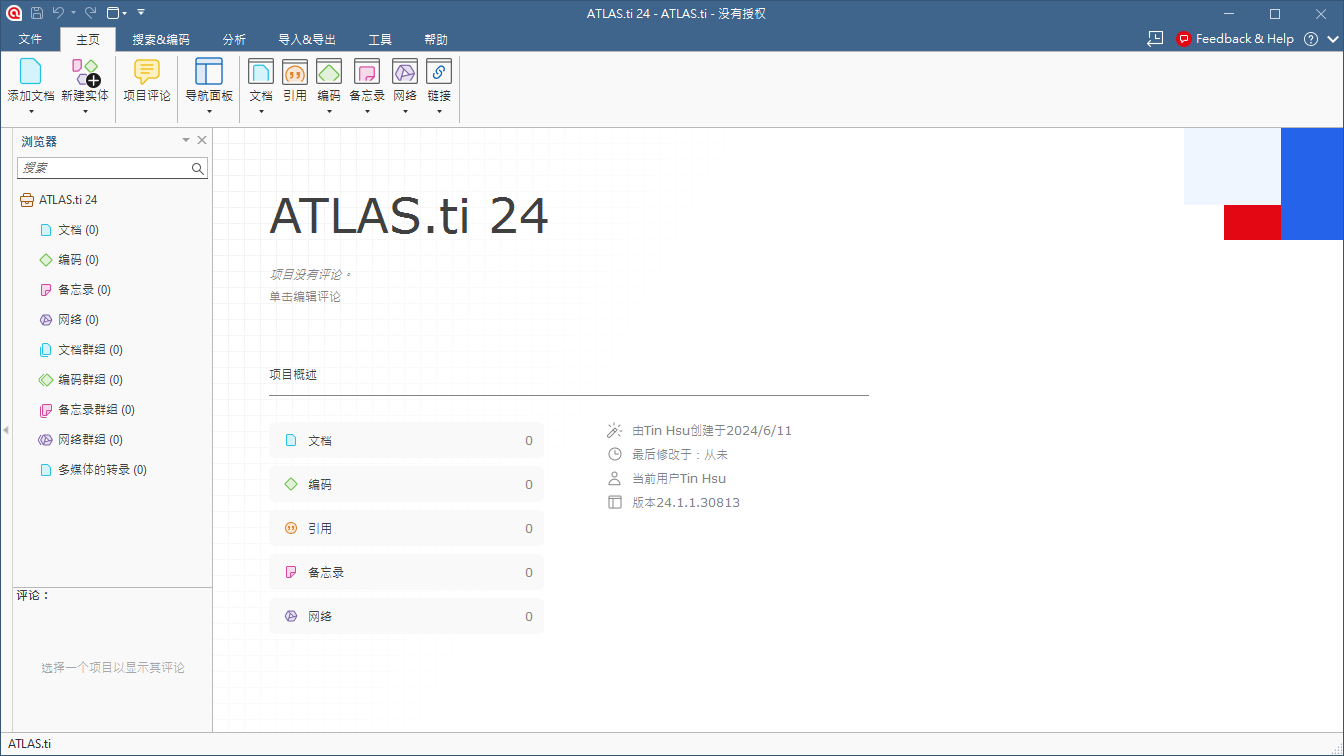
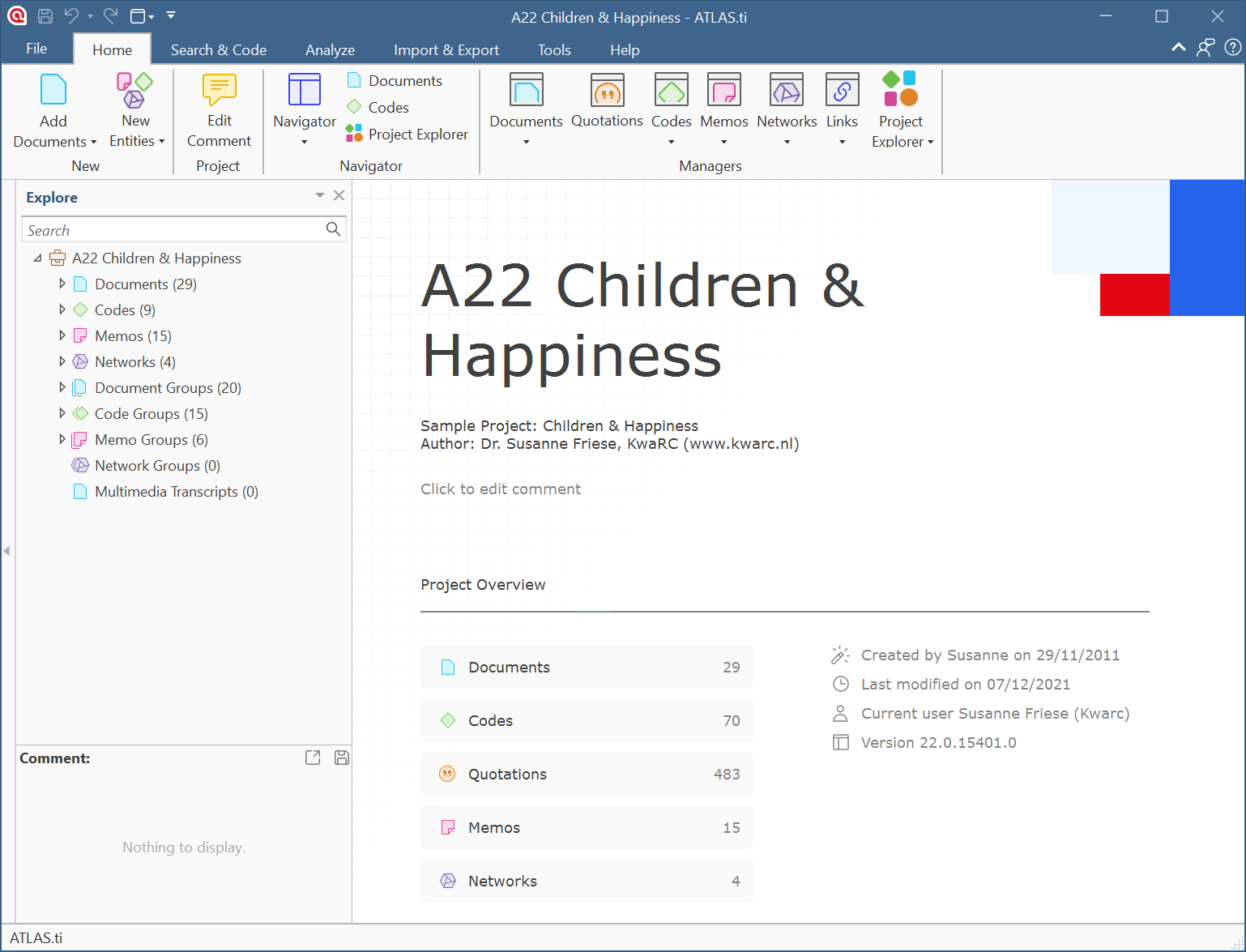
The interface has a fresh new look. When you open a project, information about your project like its comments, number of documents, codes, etc. will be displayed on the screen:
We have reorganized and extended the context menus. For instance, adding code colors is available from the code context menu.

In the Windows version, you can now also merge codes via drag & drop. Further, you can edit a comment in the Apply Coding window and in the comment area of the project navigator and the browsers. Previously you could only view them.

We have simplified number functions, like removing the code tree and code forest, transitive relations in the Relation Manager, and semantic operators in the query tool. All of these are now no longer necessary, as a true hierarchy for codes is available. Being able to simply select a category to retrieve all the quotations of its subcodes has made the semantic down operator obsolete. Selecting multiple subcodes and retrieving their quotations has made the sibling operator obsolete.


System Requirements

Windows
- Hardware: 64 bit Intel® or AMD® compatible CPU, 4GB RAM minimum (8-16GB strongly recommended), 1.5 GB free hard disk (SSD strongly recommended).
- Operating systems: Windows® 11 64-bit; Windows® 10 64-bit, at least Version 1607, "Anniversary Update."

- NOTE: Some special Windows editions, such as Windows 10N and Windows 10 for Virtual Desktops, are NOT supported.

Mac
- Hardware: Any Mac® with an Intel® or Apple Silicon CPU and at least 4GB RAM; SSD strongly recommended.
- Operating systems: macOS 11 Big Sur or higher. We recommend macOS 13 Ventura or higher.

- NOTE:  For better natural language processing results, ATLAS.ti can optionally use bigger machine learning models, which require at least 8 GB of RAM on Windows and Mac computers.


Version 24.7.11
Release date: 2024-06-06

Improvements

Gerenal:

  • use explicit apply when selecting data for filters and views

Project Import:

  • handle incorrectly referenced image import

Bug Fixes

  • restore icons for filter and view lists

ATLAS.ti 26 Qualitative Analysis Software


Key Features of ATLAS.ti 26

New Features

Create Code Hierarchies, Organize Codes in Folders

ATLAS.ti 26 provides new ways to organize codes within your coding system.

Import Social Network Comments

Social networks strongly reflect the structure and dynamics of modern society. Often, what is interesting is not a single tweet or post, but the reactions and interactions of social network users. There are many applications for analyzing user comments, including social movements, brand communities, marketing campaigns, political discourse, discussions of currently relevant topics within a community or society, audience understanding, and even online outrage or comment storms.
Supported social networks include Facebook, Twitter, Instagram, YouTube, TikTok, VK, Twitch, Discord, and Steam. Below you can see a social network conversation imported from YouTube about the new 2022 Jeep Grand Cherokee. ATLAS.ti automatically codes all users. In addition, sentiment analysis is performed to identify positive and negative statements.


Improved Survey Import
Good news for users working with survey data. We have simplified survey data import, and there is no longer any need to add syntax before importing. You can import data exported from Google Forms, SurveyMonkey, Qualtrics, and other platforms. With the help of the wizard, you can decide which data should be included or excluded and which data should be transformed.

Concept Search
This is a powerful new feature when you need to gain insights quickly. It also has many other applications, such as coding literature for literature reviews or locating information within larger reports. Concept Search identifies related concepts based on noun phrases. You can view results in context and decide which codes to apply.

Analyze Parts of Speech in Word Clouds and Lists
Word clouds and lists now offer additional filtering options. Filtering by part of speech allows you to filter data by specific grammatical elements, such as adjectives, nouns, numbers, pronouns, and more. Below is an example displaying adjectives only:

More Data Visualization Options
Data visualization is an effective way to simplify the understanding of complex relationships within data. Sankey diagrams are a powerful technique for visualizing relationships between data elements, and they were introduced in the latest version. In the new version, you can also create bar charts as an alternative view.


Analyze Code Distribution
After coding your data, examining code distribution can provide valuable insights. Which themes are mentioned more or less frequently? Who mentions them? Are there differences among different groups of respondents? How are themes distributed? Code distribution is displayed in the Document Manager and Code Manager.

Online Chat
In addition to email and telephone support, you can now chat with us whenever you have questions or encounter issues. In ATLAS.ti Windows, live chat can be accessed through the Help menu. In ATLAS.ti Mac, you can find the live chat option in the toolbar.
New Licensing Model
We have introduced a 3-year subscription model. It offers excellent value: users receive all major version upgrades throughout the subscription period, benefit from a lower subscription price compared with annual subscriptions, can prepay for multiple years to make effective use of available budget funds, and enjoy a lower annual cost.

We are transitioning to subscription licenses to ensure that all users always have access to the same program version. Past experience has shown that collaboration among users running different versions can cause problems. These issues can be avoided when everyone uses the same version.

This is becoming increasingly important because the ATLAS.ti Windows and Mac desktop versions are smoothly compatible with each other, allowing projects to move back and forth between them at any time and enabling mixed-platform teams to collaborate. In addition, projects from the Web version can be imported into the desktop versions and vice versa. All of this becomes significantly more complicated when users work with different versions.

Permanent licenses, which allow unlimited use of a specific version, have often been purchased because institutions and companies face uncertainty regarding future budgets. To address this need, we have introduced a three-year prepaid subscription. Institutions can now use their current budgets to purchase licenses that remain valid for at least three years.


What's New in ATLAS.ti Web: Visualization and Import
We have added powerful new visualizations to ATLAS.ti Web, including the donut chart and treemap examples shown above, as well as the ability to import ATLAS.ti 26 projects from the Windows and Mac versions.

Various Improvements
We have added synonym lists for all interface languages and improved the database, giving users more and better choices.
For importing data from reference managers, we now also support the .bitTex format. Combined with the EndNote .xml format, this provides nearly 100% compatibility with all reference managers.
We have expanded the range of file types that ATLAS.ti Windows can read. The following file types can be imported and converted into PDF documents:
eBooks in epub and .mobi formats
Microsoft Visio and LibreOffice / OpenOffice Draw
Presentation slides.
The interface has been refreshed. When you open a project, information about the project, such as comments, number of documents, codes, and more, is displayed on the screen.
We have reorganized and expanded the context menus. For example, code colors can now be added directly from the code context menu.
In the Windows version, you can now merge codes using drag and drop. In addition, comments can be edited in the “Apply Coding” window as well as in the annotation areas of the Project Navigator and Browser. Previously, they could only be viewed.
We have simplified several functions, such as removing code trees and code forests, transitive relationships in the Relation Manager, and semantic operators in the Query Tool. These functions are no longer necessary because true code hierarchies can now be used. The semantic downward operator has become unnecessary because users can simply select a category to retrieve all references associated with its subcodes. Likewise, the sibling operator has become unnecessary because users can select multiple subcodes and retrieve their references directly.


XSight 質性分析軟體

XSight 質性分析軟體

XSight軟體協助研究員或其他專家與非數字或無特定結構的資料一起使用編寫,比較和他們的資訊關連。 它提供分類和安排數據提供分析框架的範圍,為測試理論和關係的工具項目之間,和能力視覺上反射和提出想法和研究結果。

MAXQDA 2026 Qualitative Data Analysis Software

MAXQDA 2026 Qualitative Data Analysis Software

MAXQDA is a qualitative data analysis software solution designed to support researchers throughout the entire analysis process. It offers many advantages, including powerful coding capabilities and an intuitive user interface. Users can write annotations or reflections directly within texts and save them in dedicated “memos,” making it easy to locate and manage important notes later.MAXQDA also allows users to create simple or complex relationships between different types of data and build matrix-based datasets. These data can be viewed and analyzed directly in the matrix browser and exported

NVivo 15 Qualitative Analysis Software

NVivo 15 Qualitative Analysis Software

NVivo is a professional qualitative data analysis software solution that helps researchers better understand and uncover patterns and trends within their data. It supports multiple data sources, including text, audio, video, images, and social media content. NVivo provides an intuitive and easy-to-use interface that allows users to efficiently import, organize, and manage large volumes of data. The software also includes a wide range of analytical tools, such as thematic analysis, content analysis, and focus group analysis, enabling users to identify valuable insights from their data. In addit